 ROSEHELP
Pay consignors and vendors by PayPal or Venmo
Connect your own PayPal Business account to Rose once, then pay consignors and vendors to their PayPal or Venmo straight from MAKE PAYMENT and BATCH PAYOUT. The money comes from your PayPal balance; Rose tracks every payout until it arrives.
What you need before you startRose
PayPal and Venmo payouts are paid from your store's own PayPal Business account. Consignor Connect never holds your money. You need three things from PayPal first:
- A PayPal Business account that is verified (identity and e-mail confirmed) with your bank account linked.
- Payouts switched on for that account. PayPal approves this: ask for it on PayPal's Payouts page at paypal.com/payoutsweb (Contact PayPal support). Approval can take a few business days.
- Enough money in your PayPal balance to cover the payouts you send. Move money from your bank to PayPal a few days ahead, or turn on auto-funding in your PayPal settings.
- PayPal charges your store its own payout fee for each payout. Consignors and vendors pay nothing to receive it.
- Consignor Connect charges $0.50 per successful PayPal or Venmo payout, billed monthly to your card on file. Failed or returned payouts are not billed.
Get your PayPal app keysRose
Rose connects to your PayPal account with two keys from PayPal's developer site: a Client ID and a Secret. You only do this once, and it takes about five minutes.
- Go to developer.paypal.com and log in with your PayPal Business e-mail and password (the same login you use for PayPal).
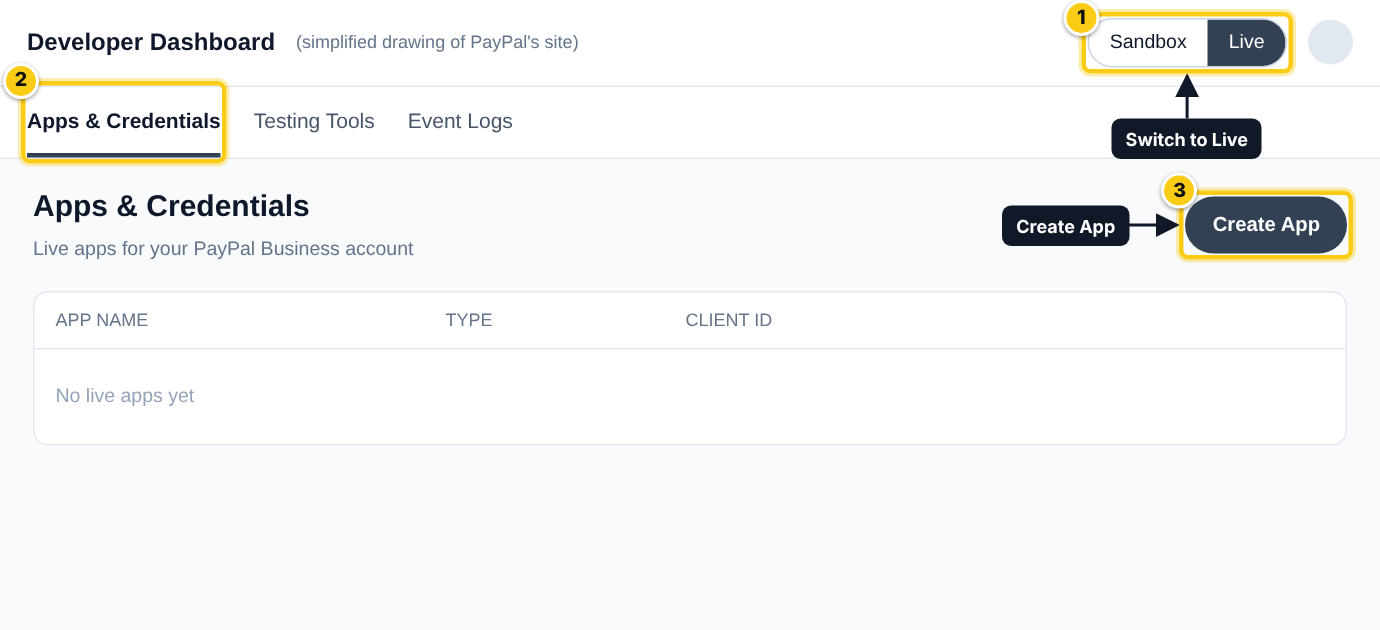
- At the top of the dashboard, switch from Sandbox to Live, and open Apps & Credentials.
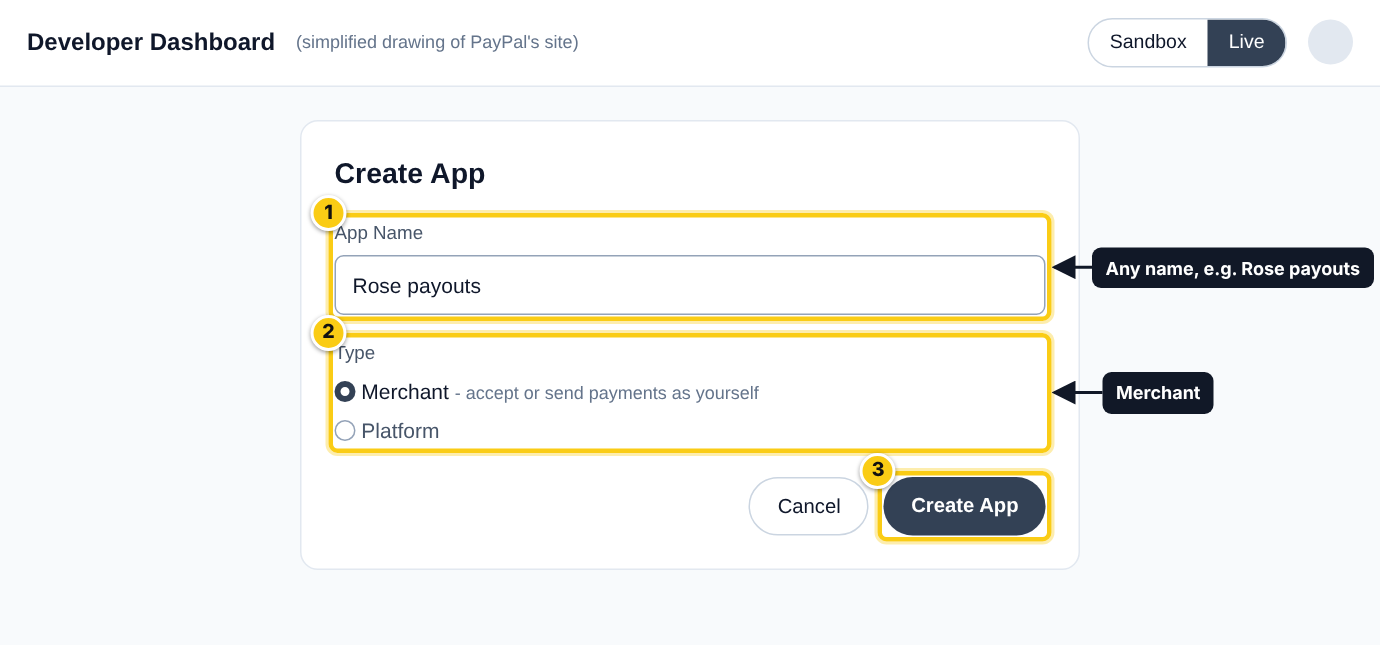
- Click Create App. Type a name such as Rose payouts, choose Merchant as the type, and click Create App.
- The app's page opens. Copy the Client ID, then show the Secret and copy it too.
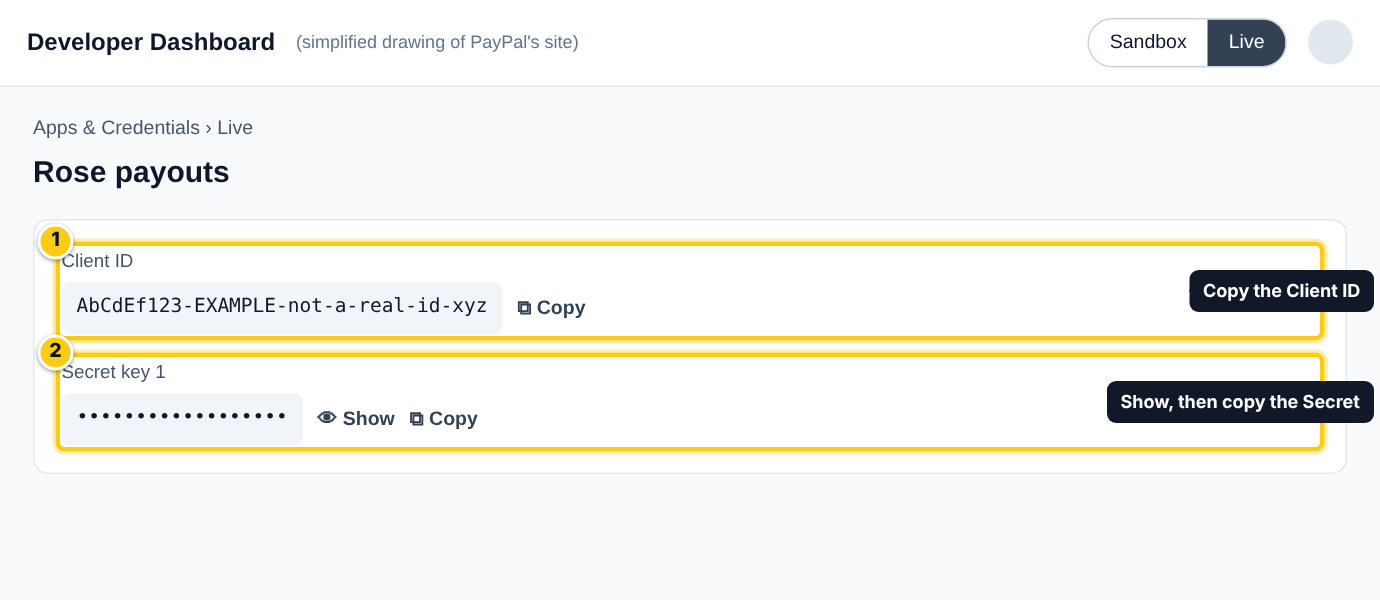
- The keys are only for Live. Keys made while the dashboard is on Sandbox are for test money and won't send real payouts.
- PayPal's pages change from time to time; if a button has another name, look for the same steps on the Apps & Credentials page.
- Coming: once Consignor Connect's own PayPal app is approved, you'll connect with one click and won't need these keys. We'll update this guide then.
Connect PayPal in RoseRose
- Go to Administration → SETTINGS → API INTEGRATIONS and click SETTINGS on the PayPal & Venmo card. The PAYPAL & VENMO PAYOUTS box opens.
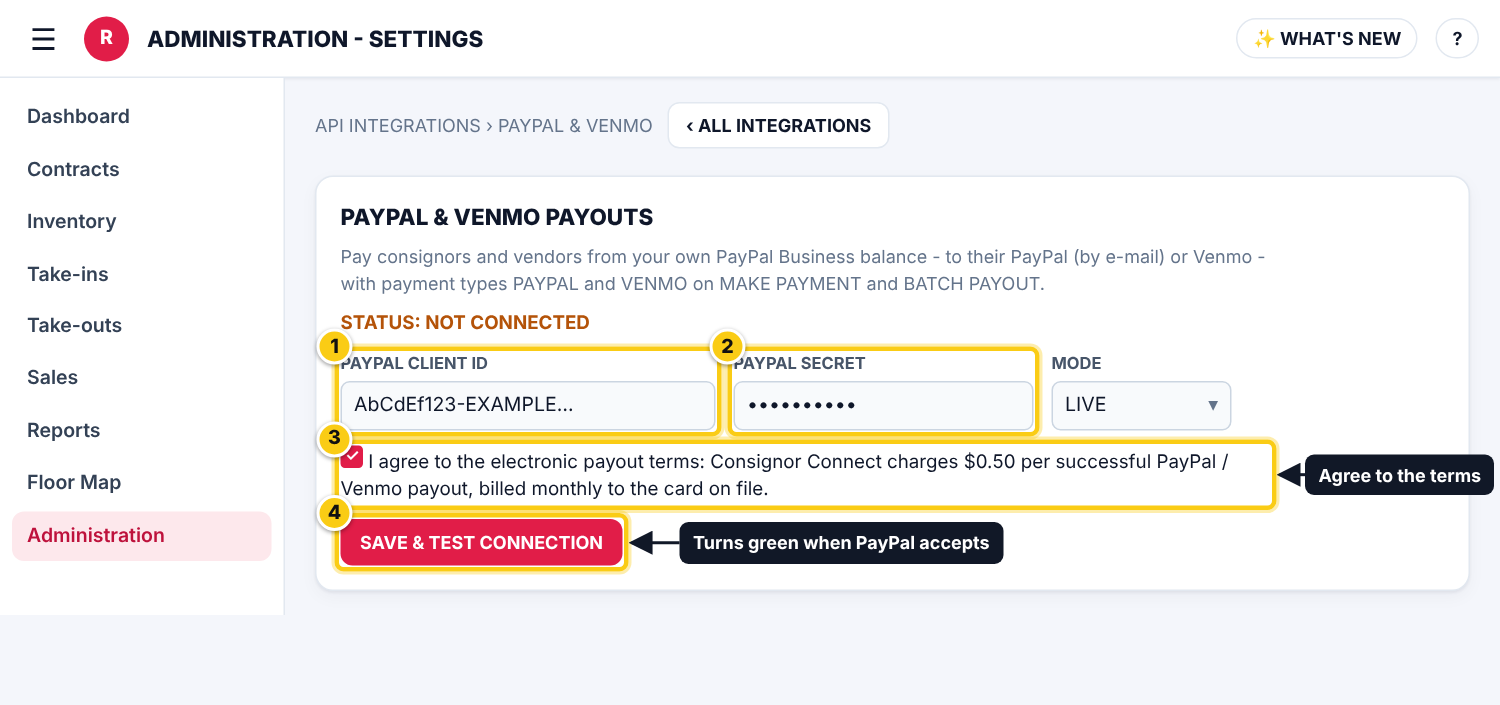
- Paste the PAYPAL CLIENT ID and the PAYPAL SECRET, and leave MODE on LIVE.
- Tick the box to agree to the electronic payout terms.
- Click SAVE & TEST CONNECTION. When PayPal accepts the keys, the status turns green: ON - PAYPAL AND VENMO ARE PAYMENT TYPES.
- If PayPal refuses the keys, the status says why (for example PAYPAL REFUSED THE KEYS). Copy them again from Apps & Credentials, making sure the dashboard is on Live.
- SANDBOX (TESTING) mode is only for trying it out with PayPal's test accounts: no real money moves.
Pay one consignor or vendorRose
- Open the contract and go to its payout screen as usual.
- Set PAYMENT.TYPE to PAYPAL or VENMO. The field below becomes SEND TO and is filled with the PayPal or Venmo details used last time for this contract, or else the contract's e-mail (Venmo: its cell phone).
- Check SEND TO: PayPal needs an e-mail address; Venmo takes a US mobile number, an @handle or an e-mail.
- Click MAKE PAYMENT and confirm. The payout is sent from your PayPal balance within about a minute.
- Rose remembers what you used for each contract, so next time it is filled in for you.
- The payout receipts list shows where it is: waiting to send, sent - on its way, sent - not claimed yet, or paid.
Pay many at once with BATCH PAYOUTRose
- Open BATCH PAYOUT and choose PAYPAL or VENMO as the payment type.
- PREVIEW as usual. Each contract is paid to its saved PayPal or Venmo details, or else its e-mail (Venmo: its cell phone).
- Pay the batch. A contract with nothing to send to is skipped with a note, so you can add its details and pay it on its own.
When a payout doesn't go throughRose
- Not claimed yet: someone without a PayPal or Venmo account gets an e-mail or text inviting them to sign up and claim it. If they don't within 30 days, PayPal returns the money to your PayPal balance.
- Returned or refused: Rose undoes the payout by itself (the activity is unpaid again and the balance is back) and shows a 💸 PAYPAL / VENMO alert. Check the details on the contract and pay again, or pay another way.
- Not enough PayPal balance: Rose keeps trying for about a day. Add money to your PayPal balance and it goes through on its own; if it still can't, it is undone and you get the alert.
- UNDO PAYOUT works while a payout is waiting to send or not claimed yet. Once PayPal has paid it, it can't be undone in Rose.
Turn it off or disconnectRose
- Go to Administration → SETTINGS → API INTEGRATIONS → PAYPAL & VENMO.
- Click TURN OFF to hide PAYPAL and VENMO as payment types, or DISCONNECT to remove the saved keys as well.
- Payouts already sent keep going and are still tracked.
Who can do this (user rights)
| Right in User Maintenance | What it allows | Who has it at first |
|---|---|---|
| Administration and Subscription Plans | Opens Administration → SETTINGS → API INTEGRATIONS → PAYPAL & VENMO, where PayPal is connected, switched on or off, and disconnected. | Users with Administration ticked in User Maintenance (normally administrators) |
| payouts (PAYOUT, BATCH PAYOUT) | Shown under Contracts. Lets the user make payouts, including with payment types PAYPAL and VENMO. | Administrator and Manager; staff only if ticked |
| undo payouts | Shown under Contracts. Lets the user UNDO a payout, which cancels a PayPal or Venmo payout that hasn't been sent or claimed yet. | Administrator and Manager |
Questions
Does Consignor Connect hold our money?
No. Payouts go from your own PayPal balance to your consignors and vendors. Rose only tells PayPal who to pay and how much.
What does it cost?
PayPal charges your store its usual payout fee. Consignor Connect charges $0.50 per successful PayPal or Venmo payout, billed monthly to your card on file. Failed and returned payouts are not billed.
Why don't I see PAYPAL or VENMO as a payment type?
PayPal isn't connected and switched on yet. Check the status in Administration → SETTINGS → API INTEGRATIONS → PAYPAL & VENMO: it must say ON.
Can I pay someone who doesn't have PayPal or Venmo?
Yes. They get an e-mail (PayPal) or text (Venmo) to sign up and claim it within 30 days. If they don't, the money returns to your PayPal balance and Rose undoes the payout.