 ROSEHELP
Post your daily sales (sales batches)
Every day Rose reads your Square sales into a sales batch. Check it, fix any line marked FAULTS, then press COMPLETE BATCH POST so each consignor and vendor is credited.
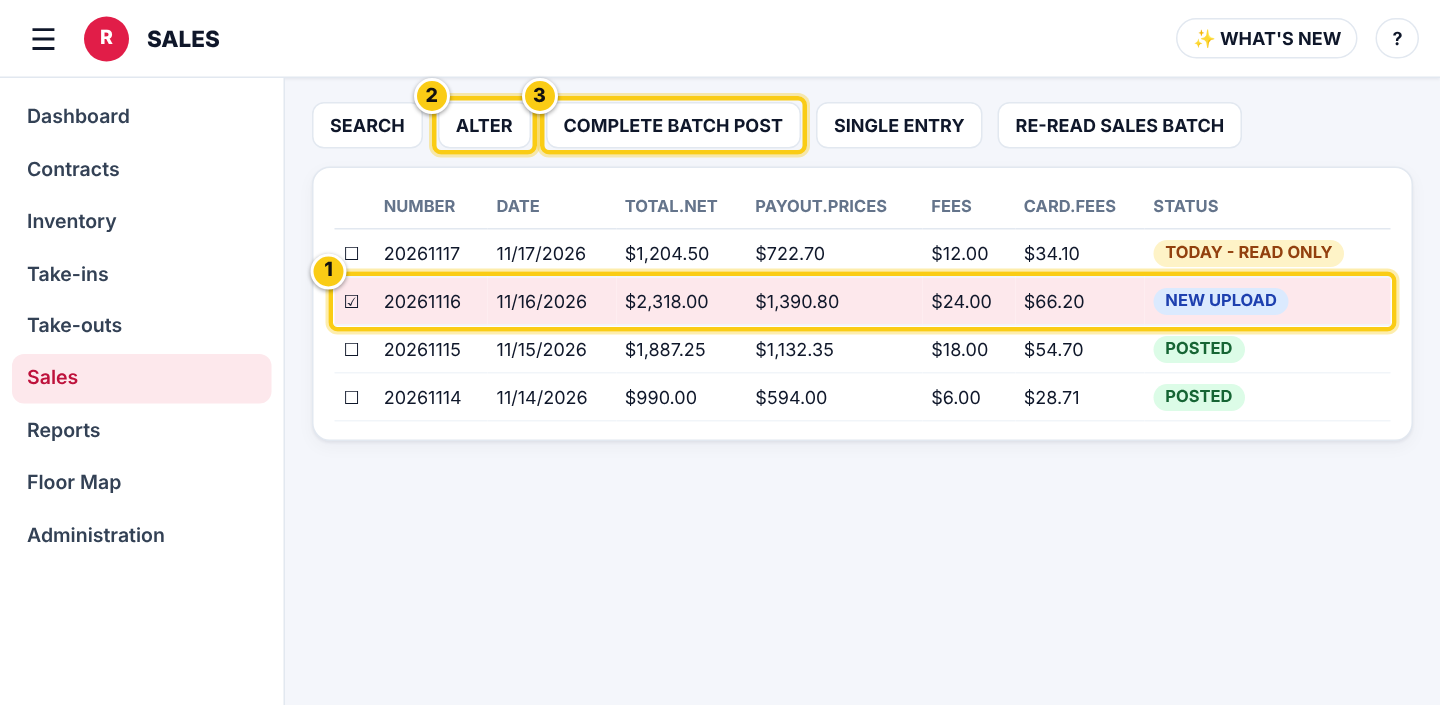
Find the batches waiting to be postedRose
Rose makes one sales batch per day from your Square sales. The Dashboard shows how many days are waiting next to your store name (for example 3 DAYS UNPOSTED · $4,512.30).
- Open Menu → Sales.
- Each row is one day. STATUS shows NEW UPLOAD (waiting), EDITING (changed, or lines left after posting), REREAD (read again from Square) or PROCESSING (being posted or read now). A batch that is fully posted leaves the list.
- Today’s batch shows TODAY - READ ONLY: sales are still coming in, so it can be checked and posted from tomorrow.
Check the batch and fix FAULTS linesRose
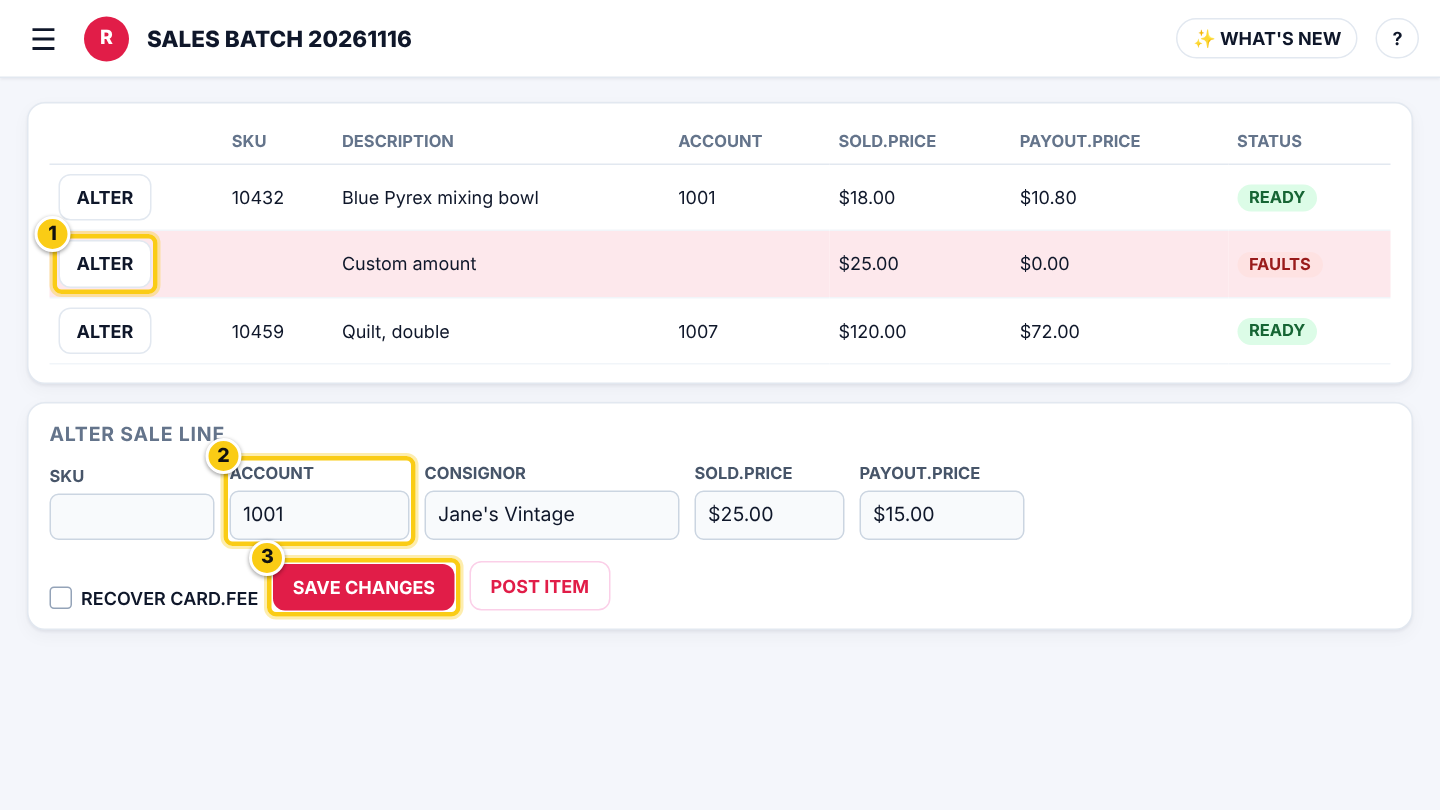
- Tick the batch and press ALTER. Every sale line is listed with its SKU, account and amounts.
- Lines marked READY are fine. A line marked FAULTS could not be matched to an item or account (for example a custom amount rung up in Square).
- Press ALTER on the FAULTS line, enter the right ACCOUNT (the consignor or vendor number) and check PAYOUT.PRICE, then press SAVE CHANGES.
- Repeat until no FAULTS lines are left that should be credited to someone.
| Field | What it means |
|---|---|
| SKU | The item’s barcode number from the label. A sale with a SKU Rose knows fills in everything else. |
| ACCOUNT | The consignor or vendor contract number that gets the money. Type it to fix a FAULTS line. |
| SOLD.PRICE | What the customer paid for the item (before tax). |
| PAYOUT.PRICE | What the consignor or vendor is owed for this sale, after the store’s split. |
| FEES | Item fees taken from the payout (set on the item or its category). |
| CARD.FEE | The card processing fee Square charged for this line. |
| RECOVER CARD.FEE | Tick to take the card fee out of this consignor’s payout. RECOVER ALL CARD.FEES does it for every line. |
| CONSIGNOR % | The consignor’s share of the sale for this line. |
| NOTES | Square’s note on the sale. Rose matches an account from the first two words of the note; numbers of one or two digits are ignored. |
Post the batchRose
- Back on the Sales list, tick the batch and press COMPLETE BATCH POST.
- Rose shows PROCESSING PLEASE WAIT... and posts every READY line in the background. You can keep working.
- When it is done the batch leaves the list (every line posted), or shows EDITING with the lines that are left, and the sales show on each contract, ready to pay out.
- FAULTS lines are never posted. Fix them, then press POST ITEM on that line (or COMPLETE BATCH POST again). A line Rose couldn’t post (account not found, CONSIGNOR % above 100, or an error) is left as FAULTS too.
- Lines that were already posted are named in a warning and left out, so a sale is never posted twice. A batch that is being posted can’t be posted or deleted again until it finishes.
- A batch left at PROCESSING because its posting failed goes back to EDITING the next time you open Sales, so you can fix it and post it again.
- Several days waiting? Post them one batch at a time, oldest first.
Who can do this (user rights)
| Right in User Maintenance | What it allows | Who has it at first |
|---|---|---|
| Sales | Opens Menu → Sales, checks and posts batches. | Users with Sales ticked |
| Sales: re-read and delete sales batches | BATCH DELETE. | Administrators |
| Sales: RE-READ SALES BATCH (read a day again from Square) | RE-READ SALES BATCH when a day is missing sales. | Administrators |
| Sales: single entry sales screen (SINGLE ENTRY) | SINGLE ENTRY sales that didn’t go through Square. | Users with Sales ticked |
Questions
Why can't I post today's batch?
Sales are still coming in today, so the batch is read only. It can be checked and posted from tomorrow.
A sale is missing from the batch. What do I do?
An administrator can press RE-READ SALES BATCH to read that day from Square again. If part of the day is already posted, Rose warns you first. Changes you made to lines not posted yet are lost, and the lines already posted are left out when you post again, so nothing is posted twice.
What happens to a FAULTS line I don't fix?
It stays in the batch and is never credited to anyone. Fix it with ALTER → ACCOUNT → SAVE CHANGES, then POST ITEM.