 ROSEHELP
⚙️ Store settings
Return or donate unsold items
Record what each consignor wants done with items that don’t sell - returned or donated - on the contract and on each item, and print it on the tag.
In RoseAll stores
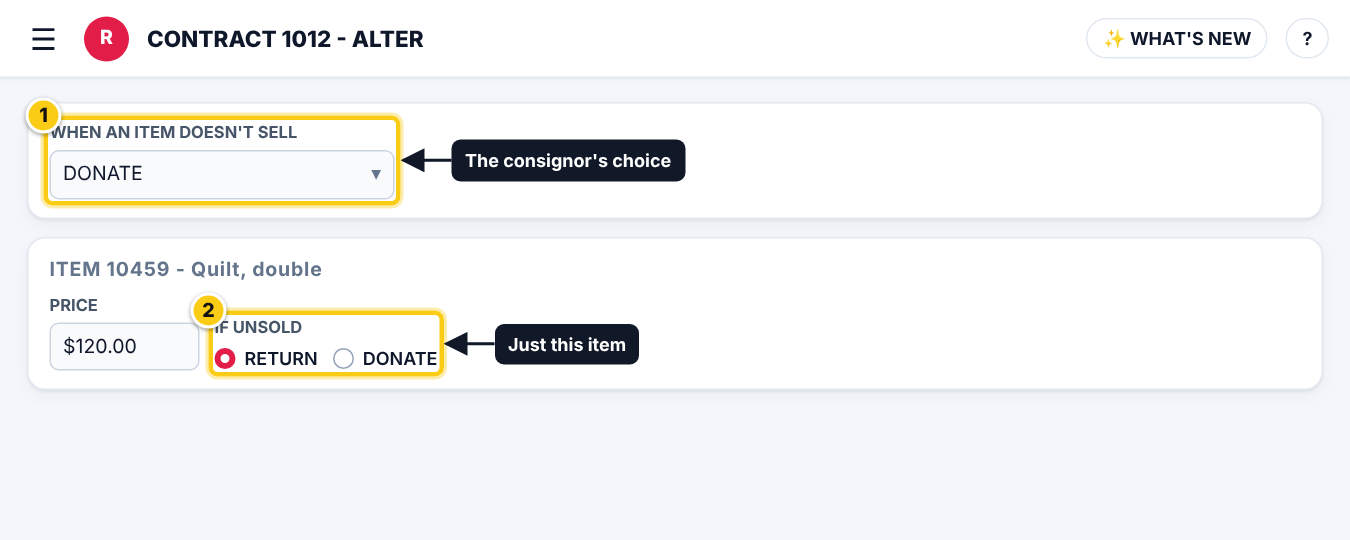
Set the consignor's choiceRose
- Open the contract, ALTER.
- Set WHEN AN ITEM DOESN’T SELL to RETURN or DONATE (or NOT SET) and save.
Change it for one itemRose
- On a take-in or in the item editor, IF UNSOLD starts with the consignor’s choice.
- Pick RETURN or DONATE for that item only.
- The choice goes with the item from take-in to inventory to take-out.
- Add the RETURN / DONATE piece in the LABEL DESIGNER to print it on tags.
Who can do this (user rights)
| Right in User Maintenance | What it allows | Who has it at first |
|---|---|---|
| Contracts | The contract’s choice. | Users with Contracts ticked |
| Take-ins / Inventory | One item’s IF UNSOLD. | Users with Take-ins or Inventory ticked |
Questions
Does Rose donate items by itself?
No. It records the choice and prints it; your staff still do the take-out or the transfer of expired items.